
Apps for older adults living alone: 7 useful features, and when two buttons are enough
Plenty of apps promise safety by listing dozens of features. For someone living alone, what counts is the part they can use every day without help: a clear question, a reply that takes one press, and a plan made of people behind the notifications.
Seven features that make a difference
None of these features is about technical power. They are about the odds that the tool still works on an ordinary day, with a battery at thirty per cent and reading glasses in another room. To compare this step with a related case, see Older person home alone: a daily safety checklist without cameras.
- A reply in one gesture. The response screen should ask for one thing only. In My Safe Circle it shows two large, clearly separated buttons, “I'm OK” and “I need help”, each with an icon and readable text.
- Approval before activation. No routine should start before the recipient has approved it. That moment is also the natural time to explain who will receive the answers and when.
- Clear roles. It must be obvious who creates the request, who answers and who may be alerted. A vague recipient list produces three simultaneous phone calls or, more often, none at all.
- A way to postpone. An explicit control to delay the reply by a few minutes stops a shower or a neighbour’s visit from being read as worrying silence.
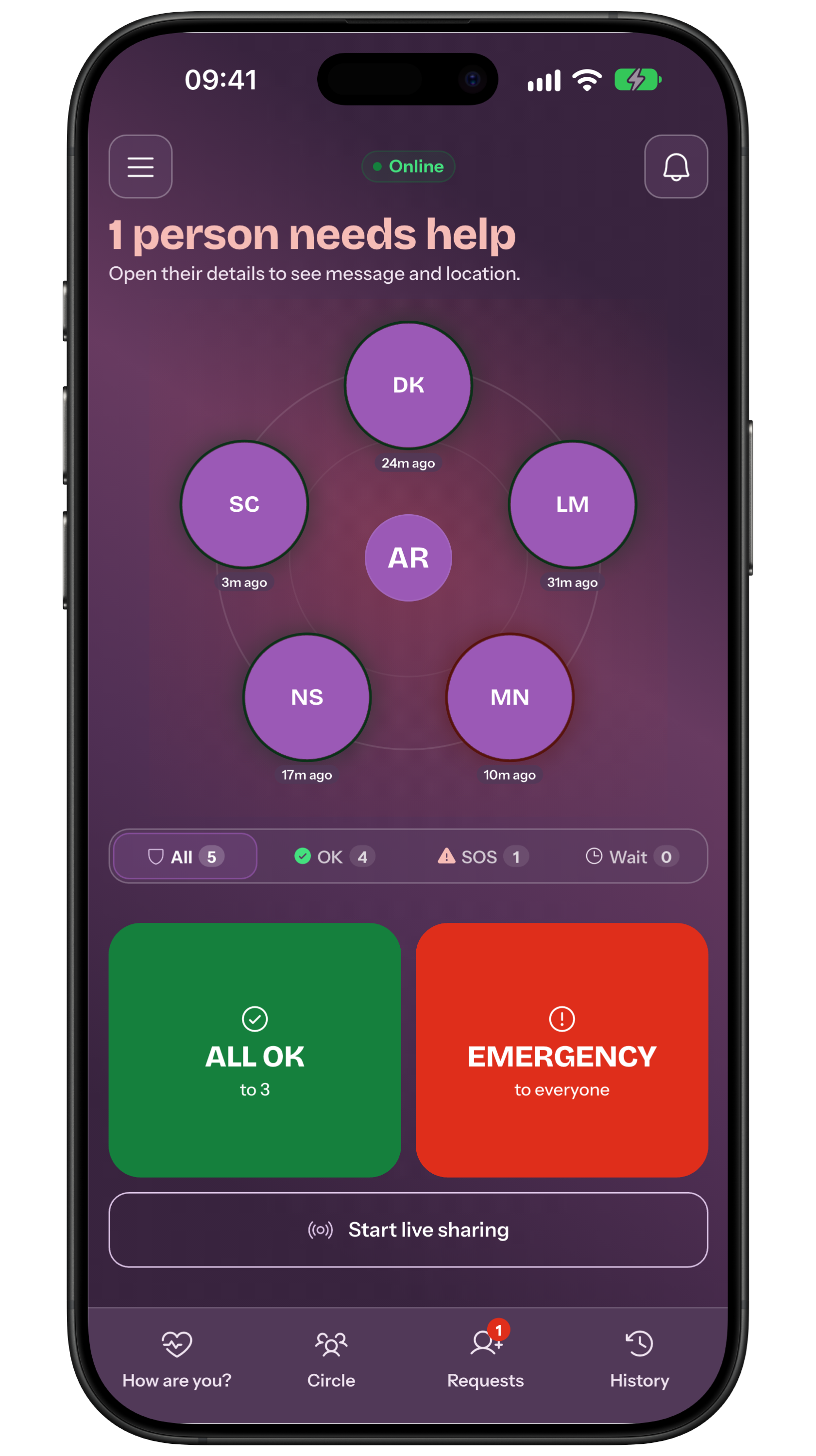
- Separate actions for reassuring and asking for help. On the My Safe Circle home screen, “All OK” and “SOS” are distinct actions: the first reassures the circle, the second asks for help. Keeping them apart reduces mistakes in a confusing moment.
- Optional location. Sharing a location should never be a condition for using the app. It is attached only if the person decides so for that single reply, with explicit consent.
- Stated limits. An honest app also writes down what it does not do: no automatic detection of falls or medical events, no automatic call to emergency services, no guarantee that a notification is delivered, read or followed by a response.
Check-ins, SOS, GPS, cameras and wearables compared
These tools do not exclude each other; they answer different questions. Before installing anything, write down the question you want answered: “is she up and well?”, “do I know where he is when he goes out alone?”, “can they ask for help quickly?”. Each question leads to a different tool and a different privacy cost.
Falls are the reason many families look at wearables in the first place: the World Health Organization lists them among the main causes of injury in later life, which explains the interest in sensors and automatic detection. It is still worth asking how reliable that detection is in a specific case, who receives the alert, and what happens while the device is charging.
How the reply works in practice
When the request arrives, the screen shows the question “How are you?” and two large, clearly separated buttons: “I'm OK” and “I need help”. There is nothing to type and no menu to search. Adding a message or a location stays optional, and the person decides each time.
If they are busy at that moment, the separate snooze control, something like “Remind me in 15 min”, moves the reply later while there is still time in the agreed window. Replying to a received request is free, and so is receiving alerts: it is creating or configuring the reminder that requires Premium.
Where My Safe Circle fits
A Premium creator can send a one-off “How are you?” request to already approved contacts or configure a recurring Reminder. The manual request does not need fresh approval for each send. The Reminder stays pending until its recipient approves it; only then does the scheduler send requests at the agreed times. In both flows, the recipient replies for free. The same operational plan is developed further in Older person living alone: how to organise a daily check-in without cameras.
“All OK” and “SOS” remain distinct home-screen actions, chosen by the person each time. The app does not automatically detect falls or medical events, makes no automatic calls, and cannot guarantee that a message is delivered, read or followed by a response: network, battery, permissions and people’s availability all affect any notification.
That is why the family plan should always include a human step. Decide who calls first, who can drop by to check, within what time, and in which cases you call local emergency services. The app organises the signal; judging the context stays with the people who know the person.
Run an accessible rehearsal before relying on it
Before relying on the routine, rehearse it together at a calm moment. Check that the person tells the two buttons apart, presses without rushing and knows where the snooze control sits. If the rehearsal needs a prompt at every step, simplify instead: enlarge the text, raise the volume, mute notifications from other apps.
- Is the text effortless to read?
- Are sound and vibration easy to notice?
- Does the notification open the right screen?
- Can both buttons be pressed without hesitation?
- Is a non-app backup channel ready?
Privacy, consent and minimum data
The European data-minimisation principle is a practical family test too: collect only what the stated purpose requires. Knowing how someone is does not require a history of their movements, and it almost never requires a camera pointed at the living room.
Explain in plain words who sees the answers, what happens if an answer is missing and how consent can be withdrawn. On iPhone and on Android, location sharing is managed in the system settings, and both makers publish official guides on turning it on and off: review them together, so nobody is left sharing a location they believed was switched off. Before testing, check the features described on the website.
- Has the person approved the routine and do they know how to pause it?
- Is it clear who receives the answers and who may be alerted?
- Does location stay optional and decided reply by reply?
- Is the phone charged, with readable text and an audible ringtone?
- Is there a backup channel if the app or the network fails?
Frequently asked questions
Do GPS and cameras have to be part of it?
No. A daily confirmation needs an agreed question and a two-button reply. Location is optional and decided for each answer; cameras weigh heavily on the privacy of everyone living in the home.
Does replying cost anything?
No. Creating or configuring a reminder and the “How are you?” request requires Premium. Replying to a received request and receiving alerts remain free.
Does the app notice by itself if someone falls?
No. My Safe Circle does not automatically detect falls or medical events and makes no automatic calls. Every reply or request for help starts with a deliberate action.
What happens if an answer never arrives?
The agreed plan applies: first the grace period, then a phone call and, if planned, an alert to approved contacts. A missing answer is a prompt to check, not proof of an accident.
Sources consulted
Technical and safety information was checked against the following official sources.
- World Health Organization: Ageing and health
- World Health Organization: Falls fact sheet
- European Commission: GDPR principles and data minimisation
- Apple Support: sharing your location from iPhone
- Android Help: managing device location settings
Editorial disclosure: this guide is published by the team that builds My Safe Circle. Alternatives are included because the right choice depends on the situation, not on the app we happen to make.
TWO BUTTONS, ONE CLEAR AGREEMENT
Set the routine up together, not on their behalf.
Configure the “How are you?” request, have it approved and check together that both buttons are clear.
Explore My Safe CircleMy Safe Circle supports communication with trusted people. It is not an emergency service, does not automatically detect falls or medical events, makes no automatic calls and cannot guarantee delivery, reading or intervention.