
How to ask several people if they are okay after a trip or event
After a trip or during an event, you may need replies from several people without relying on a confusing chat. A manual How are you? request makes the people, outcome and plan for silence explicit.
Define the question before sending
Name the observable reason: the group arrived, the event ended or you want a reply within a specific window. Do not turn a courtesy question into a health check.
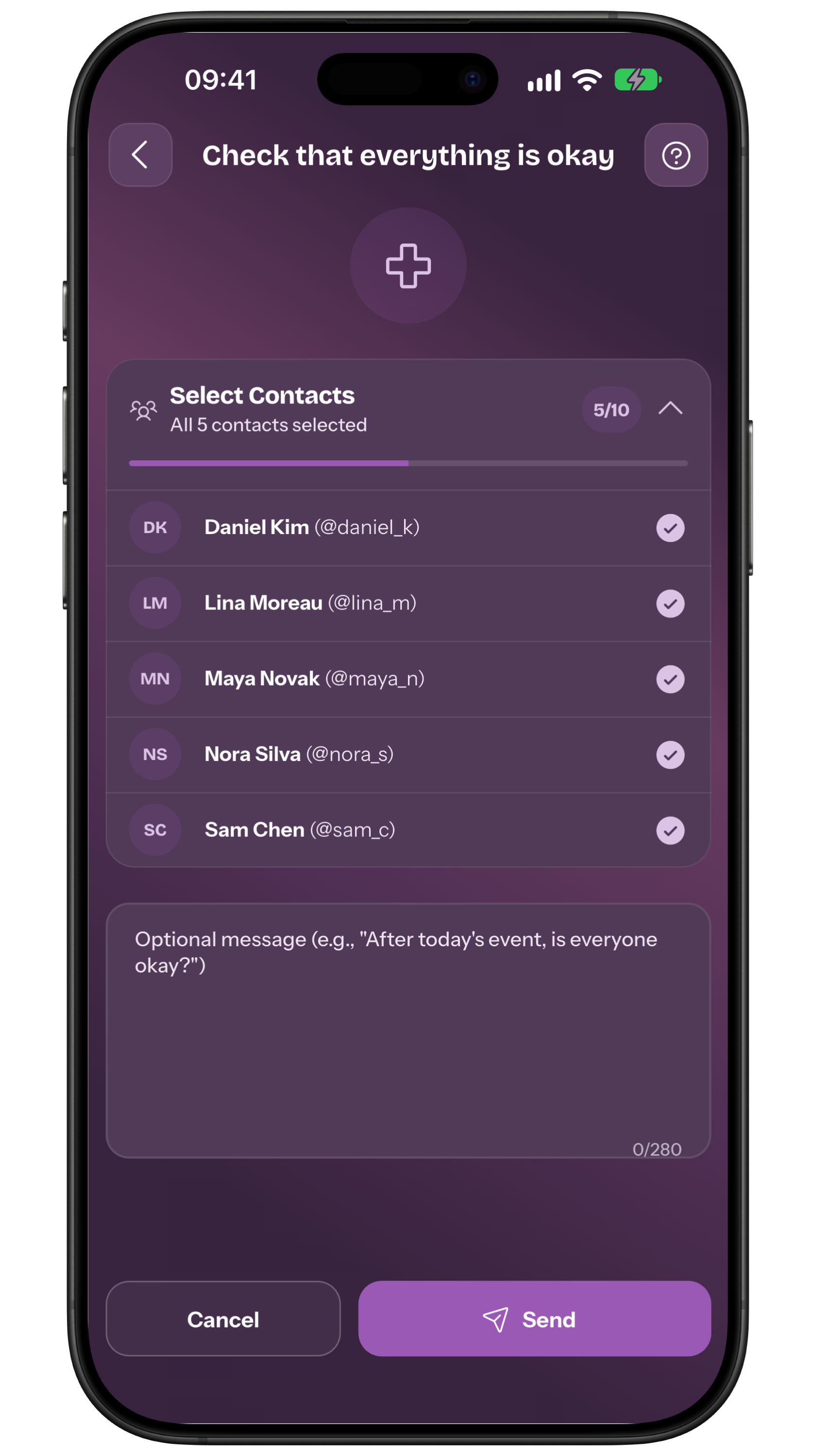
In the app the route is Home > How are you? > Ask how they are > Select Contacts: choose at least one approved contact, add the optional message if useful and tap Send. Then open My requests to read replies and status. Tell people they can reply that they are okay or need help. To compare a one-off request with a routine, see the daily check-in without cameras. If a notice says a request is already active, read it before confirming: creating a new one closes the previous request.
Choose approved people only
Select approved contacts who have accepted a place in your circle. More people do not automatically mean more safety: consider language, availability, relationship and privacy.
Check names before sending and explain who can see replies. If the group is large, name the person who coordinates the next step; a list does not assign responsibility by itself.
Set a realistic response window
A manual request starts when you create it, but a reply may come later. Agree a window that fits travel, time zones, battery, network and the event itself.
Do not promise that silence will trigger an automatic check at the end of a trip. A scheduled recurring Reminder is a different feature and needs the recipient’s specific approval.
Keep message and location optional
A short message can say “reply when you arrive” or name the meeting point. Add only useful context and do not request personal details by habit.
The person receiving the request chooses, while replying, whether to attach their location; their permission and device availability are needed. At a crowded event, a clear reply may be enough: do not confuse a signal with tracking.
Read outcomes without diagnosing
Separate people who replied, people who asked for help and people who have not replied yet. “No reply” describes a state, not its cause, and does not prove an incident.
If someone reports needing help, follow your agreement and consider a call. For immediate danger, call local services: the app cannot interpret context or replace responders.
Rehearse before the real occasion
Run an announced test with two or more contacts: sending, alert, reply, optional message, status and the backup call. Check the route on the real phone.
After the test, correct names, timing and instructions. To assign the next step when several people receive one signal, see the roles and responsibility protocol.
Frequently asked questions
Can I ask several people if they are okay without creating a Reminder?
Yes. A manual How are you? request is created and sent immediately to approved contacts; a Reminder is recurring and needs the recipient’s approval.
Do people replying need Premium?
No. Creating a manual request requires Premium, while receiving it and sending a reply are free.
Does a missed reply automatically start a check?
No. Agree a margin and backup channel, then call or check according to the plan. Do not assume an automatic end-of-trip timer.
Sources consulted
Technical and safety information was checked against the following official sources.
Editorial guide from My Safe Circle, checked on 9 September 2026 against the app manual and published features. A manual request requires Premium for its creator; receiving and replying remain free. It is not an automatic end-of-trip timer.
A CLEAR REQUEST
Ask for a reply, not control.
Choose people, explain the plan and agree the next step.
Explore My Safe CircleMy Safe Circle coordinates voluntary requests with approved contacts. It is not an emergency service or medical device, does not detect events automatically and cannot guarantee delivery, reading, a reply or action.